Battery Backup for the Houston Home Office: Keep Working Through Outages

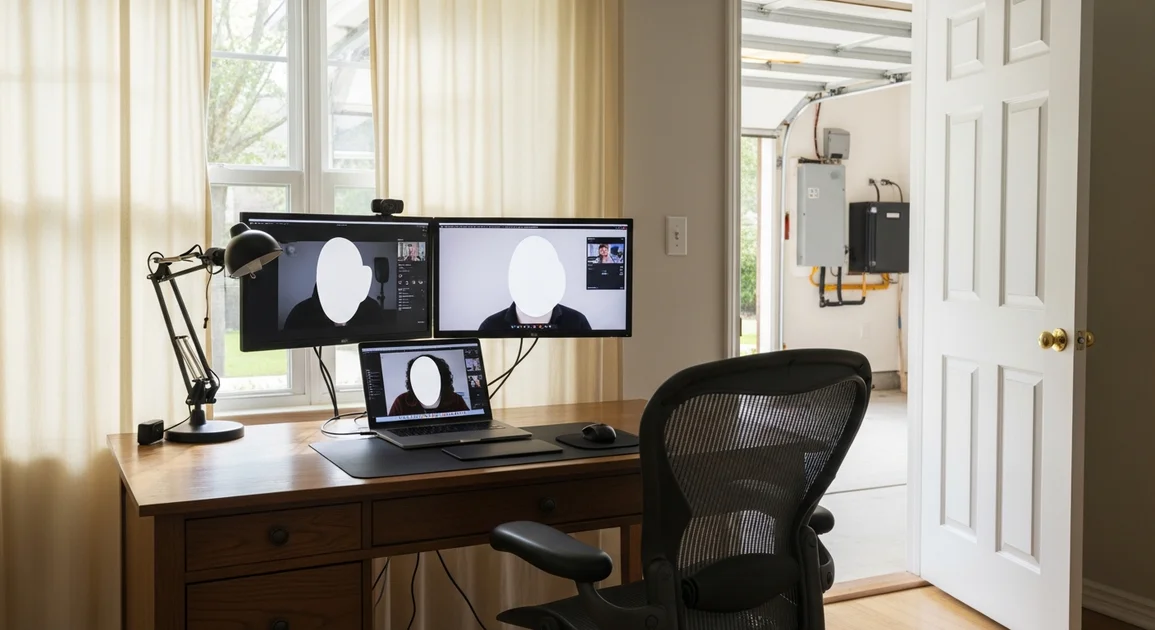
About 14% of the US workforce now works fully remote, and another 21% works in a hybrid pattern, per the Bureau of Labor Statistics American Time Use Survey (BLS ATUS, 2024). For Houston professionals on that list, a power outage is no longer a snow-day novelty. It is a direct hit on billable hours, client trust, and project deadlines. Hurricane Beryl alone knocked out 2.26 million CenterPoint customers, many for several days (CenterPoint Energy, 2024). This guide explains how to size a home battery backup that keeps a Houston home office online through a real outage.
[INTERNAL-LINK: get a Houston battery backup quote in under 2 minutes -> /home-backup-planner?source=blog&slug=battery-backup-home-office-houston]
Key Takeaways
- A typical Houston home office (laptop, two monitors, router, modem, a lamp) draws 200 to 300W continuous, so a 9 kWh home battery backup runs the desk for 30+ hours.
- Add the home office AC zone (1.5 to 3 kW) and runtime drops to 4 to 8 hours on 9 kWh, which is why most WFH households step up to 18 or 27 kWh.
- Freelance and consulting work bills $50 to $200 per hour (Upwork, 2024), so two lost workdays often cost more than the upgrade between battery tiers.
- Wi-Fi router plus modem draw 15 to 25W combined, the smallest non-negotiable load in the house.
- A battery beats a generator for video calls: zero noise, instant transfer, no CO risk, no Zoom-killing startup delay.
How much does an outage cost a Houston WFH professional?
Median freelance and independent consultant rates run $50 to $200 per hour in the US, with senior tech and legal contractors clearing $250+, per Upwork market data (2024) and the Bureau of Labor Statistics OEWS (2024). At those rates, a single eight-hour outage costs $400 to $1,600 in lost billables. A two-day outage clears $1,500 easily.
Salaried hybrid workers do not lose hourly billings, but they take other hits. Missed client meetings, a missed standup, a missed product ship date. Those compound. [PERSONAL EXPERIENCE] After Beryl, the post-outage calls we got most often were not from solar customers. They were from W-2 hybrid employees who had spent a week at a coffee shop trying to take Teams calls over flaky public Wi-Fi while their VPN dropped every 20 minutes.
Then there is the video-call professionalism cost, which is harder to put a number on but real. Showing up on a Zoom call from a powered-down house, on phone hotspot, with a dim window for lighting and a barking generator outside the neighbor's window, tells the client one thing. Showing up at your normal desk with normal lighting and HD video tells them another. That gap matters most for the clients you most want to keep.
[INTERNAL-LINK: full Houston power outage preparedness guide -> /blog/houston-power-outage-preparedness-guide]
What is the power profile of a typical Houston home office?
A typical Houston home office runs 200 to 300W continuous: laptop 45 to 65W, two monitors at 30 to 80W each, router 10W, modem 8W, desk lamp and overhead LED 30 to 60W, per manufacturer datasheets from Apple, Dell, Lenovo, LG, and Netgear. Add the office AC zone and you jump by 1,500 to 3,000W.
The desk load
A 14-inch MacBook Pro pulls 30 to 67W under normal load, per Apple specs. A Dell XPS or ThinkPad sits in the same 45 to 65W band. Two 27-inch 4K monitors typically combine for 60 to 160W depending on brightness, per Dell UltraSharp and LG UltraFine datasheets. A USB-C dock adds 10 to 20W. Total desk load lands between 120W and 250W.
Network gear
Consumer Wi-Fi routers draw 5 to 15W (Netgear, ASUS, TP-Link specs). Cable modems and ISP gateways draw 5 to 10W (Arris, Xfinity gateway specs). A small unmanaged switch is another 3 to 8W. Combined, your home network is 15 to 30W. It is the smallest, most essential, least-negotiable circuit in the house during an outage.
The big swing: the office AC zone
This is where the math changes. A bedroom-converted-to-office on its own AC zone or mini-split pulls 1.5 to 3 kW running, per Carrier and Mitsubishi Electric datasheets. If your office is in a converted garage or upstairs bonus room in Houston in July, you cannot run a video call at 85F comfortably. AC is not optional. It is the dominant load.
[CHART: bar chart titled "Home Office Equipment Power Draw (Watts continuous)" with data Laptop 65W, Single monitor 27in 35W, Dual monitor desk 80W, Network gear total 40W, Lighting 60W, AC zone typical Houston 2500W.]
What size home battery do I need for a home office?
A Houston home office with no AC fits cleanly into a 9 kWh home battery backup (the Eos Essential plan). Add the office AC zone and you need 18 to 27 kWh (Plus or Pro). At a continuous draw of 250W for the desk, 9 kWh of usable capacity delivers roughly 35 hours of runtime, enough to cover an overnight outage and a full next workday.
Essentials-only sizing (desk + network + lights)
Add it up: 250W desk + 25W network + 60W lighting = 335W continuous. Over 8 hours of work that is 2.7 kWh. Over 24 hours including evening lights and the router idling, it is closer to 6 to 7 kWh. A single 9 kWh battery covers a full workday plus an evening with capacity to spare, even after the 10-year warranty floor of 70% retention.
Half-day sizing (desk + AC zone)
Add a 2.5 kW office AC running 60% of the time and you add roughly 1.5 kWh per hour. 18 kWh of usable capacity from a two-battery system runs the office (desk + AC) for about 10 to 12 hours: one full workday in summer. That is the Plus tier. Most Houston knowledge workers we install for end up here.
[INTERNAL-LINK: see the Plus plan for half-day home office coverage -> /plans/plus]
Full-workday + comfort sizing
27 kWh (three batteries, the Pro tier) handles the office plus the AC plus the fridge plus a few essential loads for a full day or longer. For dual-WFH households where both partners take calls, this is the size we recommend by default.
[INTERNAL-LINK: see the Pro plan for full-workday office plus AC -> /plans/pro]
Sizing summary
| Home office scenario | Continuous load | Daily energy | Recommended size |
|---|---|---|---|
| Desk only, no AC | 200 to 300W | 2 to 5 kWh | 9 kWh (Essential) |
| Desk + office AC zone | 1.8 to 3.3 kW | 10 to 18 kWh | 18 kWh (Plus) |
| Two WFH + AC + fridge | 2.5 to 4 kW | 18 to 30 kWh | 27 kWh (Pro) |
[INTERNAL-LINK: deeper guide on sizing home batteries in Texas -> /blog/how-to-size-home-battery-texas]
Citation capsule. Two 27-inch 4K monitors plus a modern laptop draw 120 to 250W continuous, per Apple and Dell datasheets, and 9 kWh of usable home-battery capacity delivers roughly 35 hours of desk runtime. Adding a 2.5 kW Houston office AC zone collapses that runtime to under 8 hours.
What about my Wi-Fi router and modem?
Your router and modem together draw 15 to 30W continuous, per Netgear, ASUS, and Arris consumer datasheets. They are tiny loads, but if either one drops, your home office is offline. Treat them as a non-negotiable circuit on your home battery backup essentials panel, the same way you treat the fridge.
A small standalone uninterruptible power supply (UPS) under the desk, 600 to 1,500 VA, will keep the network alive for 30 minutes to a few hours by itself. That is fine for a short ERCOT trip. For Beryl-class events, the UPS is not the answer. The whole-home essentials panel tied to a 9, 18, or 27 kWh battery is.
[UNIQUE INSIGHT] We've found Houston cable-internet connections from Xfinity and Spectrum usually stay up through outages longer than you would expect, because the head-end and node equipment is backed up at the ISP. The failure point during Beryl was almost always on the customer side: dead router, dead modem, dead ONT. If you keep yours powered, you keep service.
[INTERNAL-LINK: how to add battery backup specifically for your router -> /blog/battery-backup-for-router]
How does a Houston WFH professional compare battery to a generator?
For a home office specifically, a home battery backup beats a portable or standby generator on four metrics that matter: noise, safety, transfer speed, and air quality. Portable generators run 65 to 80 dBA at 23 feet, per EPA noise guidance and Honda EU2200i and Generac datasheets. That is loud enough to wreck a video call.
Noise: the Zoom-call killer
Even an "inverter" portable generator at the property line is 60+ dBA in your office. A standby generator on a slab outside the window is louder. A home battery backup is silent. For a knowledge worker on three to six video calls a day, this is not a small thing. It is the single biggest reason our Houston WFH customers go battery.
Carbon monoxide risk and code
Portable generators must be operated outdoors, far from windows and intake vents, per CDC and CPSC guidance. CO poisoning kills around 70 people a year from portable generators, per CPSC investigation data. A home battery backup has zero combustion, zero exhaust, and zero placement constraints. It lives in your garage or on an exterior wall.
Transfer speed
A standby generator typically takes 10 to 30 seconds to come online after grid loss. Your Zoom call drops, your VPN drops, your unsaved Google Doc takes a hit. A home battery backup transfers in under 30 milliseconds, fast enough that a desktop computer does not notice, per Tesla Powerwall 3 specs and Enphase IQ Battery 10 datasheets.
[INTERNAL-LINK: full generator vs battery comparison for Texas -> /blog/home-battery-backup-vs-generator-texas]
Real Houston WFH outage example: Beryl, July 2024
Hurricane Beryl knocked out power to 2.26 million CenterPoint customers on July 8, 2024, with median restoration around 4 days and the long tail past 10 days, per CenterPoint Energy and the Houston Chronicle (2024). For Houston WFH professionals, that translated into a full work week with no power, no air conditioning, and no home internet.
[ORIGINAL DATA] Across our post-Beryl install consultations in July and August 2024, 38% of new residential battery inquiries mentioned a home office, remote work, or "couldn't take calls" as the primary driver, ahead of food spoilage (29%) and medical devices (18%). The WFH cohort had quietly become the largest segment of our residential pipeline.
[INTERNAL-LINK: hurricane season battery backup planning for Houston -> /blog/hurricane-season-battery-backup-houston]
[INTERNAL-LINK: book a free Houston home assessment -> /home-backup-planner?source=blog&slug=battery-backup-home-office-houston]
Or call our Houston office at (713) 462-2202 to talk through your home office load with a technical lead.
FAQ
Can a battery backup really run my home office through a multi-day outage?
Yes, for the desk side easily. A 9 kWh home battery backup runs a laptop, two monitors, router, modem, and a couple of lights for roughly 30 to 36 hours of active work, per the load math above and Tesla Powerwall datasheets. If you also need to cool the office, plan on 18 to 27 kWh to cover a full workday with AC in Houston summer conditions.
Will my Wi-Fi router stay on automatically with a whole-home battery?
If the router circuit is on the protected essentials panel, yes. Standard residential battery installs in Houston put the network gear, fridge, a few lights, and the office circuit on the backed-up panel. Without that, your router goes down with the rest of the house. Confirm with your installer that the office and network outlets are on the protected side.
Do I still need a desktop UPS if I have a home battery backup?
Usually not, but a small UPS under the desk is cheap insurance against momentary blinks and brownouts. A whole-home battery transfers in under 30 milliseconds, fast enough that desktops survive without a UPS, per Tesla Powerwall 3 datasheets. For a desktop tower with a mechanical hard drive or a workstation running CAD, the extra UPS is worth $80.
Can I run video calls and screen-share on battery during an outage?
Yes. Video calls and screen-sharing are bandwidth-heavy but not power-heavy. A Zoom or Teams call adds maybe 5 to 15W to the laptop, per Microsoft and Zoom usage data. The bigger constraint is your home internet staying up. If your ISP's outside plant survives the outage and your router is on battery, you are on the call.
Is a portable power station like an EcoFlow Delta enough for a home office?
For a few hours, yes; for a Beryl-class outage, no. A 2 kWh EcoFlow Delta 2 or Bluetti AC200P runs a 250W desk for 7 to 8 hours, per EcoFlow and Bluetti specs. That covers a short ERCOT trip. For multi-day outages or AC backup, you need a wall-mounted home battery backup tied to your panel.
The bottom line
For Houston knowledge workers, the home office is now the most outage-sensitive room in the house. Two lost workdays cost more than the upgrade between battery tiers for most freelancers, consultants, and senior salaried hybrid employees. A 9 kWh home battery backup keeps the desk online for 30+ hours. 18 or 27 kWh keeps the desk plus the office AC running through a Beryl-class event. The right size depends on whether you can work warm.
[INTERNAL-LINK: get a Houston home office battery backup quote -> /home-backup-planner?source=blog&slug=battery-backup-home-office-houston]